
MPO One Click Cleaner Technical Support
- Product Overview
The MPO ONE CLICK Cleaner is a professional, easy-to-operate tool designed specifically for cleaning the ferrule end-faces of MPO (Multi-fiber Push-On) and MTP® connectors. It adopts a one-click mechanical operation design, which can quickly and effectively remove dust, oil stains, and other contaminants from the connector end-face without damaging the ferrule or affecting optical performance. This cleaner is widely used in high-density optical networks such as data centers, telecom rooms, and enterprise optical links, and is compatible with both male (with guide pins) and female MPO connectors, as well as 12//16/24 fiber SM/MM connectors and UPC/APC polishing types.
Key features include electrostatic discharge (ESD) protection, compliance with IEC 61340-5-1 standards, a compact and portable handheld design, and a long service life with hundreds of cleaning cycles per unit. It realizes dry cleaning without the need for additional chemical solvents, ensuring safe and environmentally friendly operation while maintaining optimal low-loss performance of optical connections.
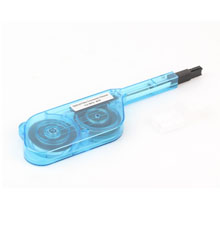
- Operation Guide
2.1 Pre-Cleaning Preparation
- Inspect the MPO ONE CLICK Cleaner for any physical damage (e.g., cracks on the body, loose cleaning tip). If damage is found, stop using the cleaner immediately and replace it with a new one.
- Check the cleaning tape status through the observation window (if equipped). If the tape is dirty or worn out, the cleaner has reached the end of its service life and should be replaced.
- Visually inspect the MPO connector end-face and guide pin area for obvious debris or contamination. For large particles, it is recommended to remove them gently with compressed air before using the cleaner to avoid scratching the ferrule.
- Ensure the operating environment is clean and free of excessive dust. Avoid using the cleaner in humid, high-temperature, or direct sunlight environments.
2.2 Step-by-Step Cleaning Instructions
The MPO ONE CLICK Cleaner can be used to clean connectors installed in bulkhead adapters and exposed connector plugs on fiber cables. Follow the corresponding steps below:
2.2.1 Cleaning Connectors in Bulkhead Adapters
- Remove the guide cap from the cleaner. For models with an extendable nozzle, adjust the nozzle length according to the adapter depth if necessary.
- Align the cleaner’s guide key with the adapter’s keyway to ensure precise alignment with the connector ferrule.
- Insert the cleaner straight into the adapter until the guide tip touches the inside of the adapter. Do not insert at an angle to avoid damaging the connector or cleaner.
- Push the cleaner forward firmly until you hear a clear “click” sound. This sound indicates that the cleaning process is complete, and the mechanical mechanism has advanced the cleaning tape to a fresh section.
- Pull the cleaner straight out of the adapter gently. Do not twist or apply excessive force during removal.
- Use a fiber microscope (e.g., Fluke FT600 FiberInspector™) to inspect the connector end-face. If contamination remains, repeat the cleaning process 1-2 times. If the contamination still exists, switch to wet cleaning methods as needed.
2.2.2 Cleaning Exposed Fiber Jumper Connectors
- Remove the attachment from the cleaner’s guide. Align the attachment’s key with the connector plug’s keyway, then insert the plug straight into the attachment and push until a click is heard. Hold the attachment firmly with your fingers during this process.
- Align the attachment with the cleaner’s guide key, then insert the guide straight into the attachment until it reaches the insertion point.
- Push the cleaner’s main body straight into the connector plug until a click sound is heard, indicating the completion of cleaning.
- Pull the cleaner straight out gently, then remove the connector plug from the attachment. Inspect the end-face with a fiber microscope and re-clean if necessary.
2.3 Post-Cleaning Notes
- After cleaning, cover the cleaner’s guide cap immediately to prevent dust from contaminating the cleaning tip.
- If the cleaner is not used for a long time, store it in a dry, clean environment, away from direct sunlight and high temperatures.
- Do not touch or pull the cleaning tape manually, as this will damage the tape and affect cleaning performance.
- Technical Specifications
| Parameter | Specification |
| Applicable Connectors | MPO/MTP® connectors (12/24 fiber, SM/MM); male (with guide pins) and female ferrules; UPC/APC polishing types |
| Cleaning Method | Dry cleaning (optical-grade cleaning tape, no chemical solvents) |
| Cleaning Cycles | ≥ 500 times (varies by model; some models support up to 600+ cycles) |
- Troubleshooting
| Problem | Possible Causes | Solutions |
| No “click” sound when pushing the cleaner | 1. The cleaner is not inserted correctly or aligned properly with the connector. 2. The cleaning tape is exhausted. 3. Internal mechanical failure. | 1. Re-insert the cleaner, ensuring alignment with the keyway and proper insertion depth. 2. Check the cleaning tape and replace the cleaner if exhausted. 3. Stop using and contact after-sales support for repair or replacement. |
| Connector end-face is still contaminated after cleaning | 1. Excessive contamination (e.g., heavy oil stains) that requires wet cleaning. 2. Cleaning tape is dirty or worn. 3. Incorrect insertion angle or insufficient pushing force. | 1. Use a fiber cleaning solvent for wet cleaning first, then repeat dry cleaning with the MPO ONE CLICK Cleaner. 2. Replace the cleaner with a new one. 3. Re-insert the cleaner straight and push firmly until a click is heard. |
| Cleaner cannot be inserted into the adapter/connector | 1. Misalignment between the cleaner’s guide key and the adapter/connector keyway. 2. The connector is damaged or deformed. 3. The cleaner’s guide tip is contaminated or damaged. | 1. Adjust the alignment to match the keyway. 2. Inspect the connector and replace it if damaged. 3. Clean the guide tip gently or replace the cleaner. |
| Cleaner is stuck in the adapter/connector | 1. Inserted at an angle. 2. Excessive force applied during insertion. 3. Foreign objects stuck between the cleaner and adapter. | 1. Do not forcefully pull; gently rotate the cleaner slightly while pulling straight out. 2. If stuck tightly, contact a professional technician to avoid damaging the connector or adapter. |
| Static electricity attracts dust after cleaning | 1. Using a non-ESD compliant cleaner. 2. Operating in an ungrounded ESD environment. | 1. Replace with an ESD-compliant MPO ONE CLICK Cleaner (compliant with IEC 61340-5-1). 2. Ensure operation in an ESD-protected area and wear anti-static gloves. |
- Safety & Maintenance
5.1 Safety Precautions
- Do not disassemble the cleaner, as this will damage the internal mechanical structure and void the warranty. Internal components are not user-serviceable.
- Keep the cleaner away from children and pets to avoid accidental ingestion or damage.
- Do not use the cleaner for any purpose other than cleaning MPO/MTP® connector end-faces. Using it for other applications may cause damage to the tool or equipment.
- When inspecting the connector end-face after cleaning, avoid looking directly at live fiber ports, as laser beams are harmful to the eyes.
- Do not apply excessive force during insertion or removal, as this may damage the connector ferrule or the cleaner’s guide tip.
5.2 Maintenance Tips
- Regularly inspect the cleaner’s guide cap and cleaning tip for contamination. If dirty, wipe gently with a lint-free cloth.
- Replace the cleaner when the cleaning tape is exhausted (indicated by dirty/worn tape or failure to produce a click sound).
- Store the cleaner in a dry, clean, and well-ventilated environment. Avoid storage in humid, high-temperature, or corrosive environments to prevent deformation or damage.
- For ESD-compliant models, avoid contact with non-conductive materials for extended periods to maintain ESD performance.
- Frequently Asked Questions (FAQs)
Q1: Can the MPO ONE CLICK Cleaner be reused?
A1: Yes, each cleaner can be used for up to 500-600 cleaning cycles (depending on the model). Once the cleaning tape is exhausted, the cleaner should be replaced with a new one. Do not attempt to replace the tape manually, as this will affect cleaning performance and may damage the tool.
Q2: Is the cleaner compatible with both 12-fiber and 24-fiber MPO connectors?
A2: Yes, most MPO ONE CLICK Cleaner models are compatible with 12/24 fiber SM/MM MPO/MTP® connectors. Some models also support 4, 8, 16, 32, 48, and 60 fiber connectors, making them suitable for various high-density optical network applications.
Q3: What should I do if the cleaner damages the connector ferrule?
A3: Stop using the cleaner immediately. Check if the cleaner is damaged or if the insertion angle was incorrect. If the connector ferrule is scratched or damaged, it may affect optical performance and should be replaced. Contact your connector supplier for replacement have a cleaner inspection.
Q4: Can the cleaner be used in ESD-sensitive environments?
A4: Yes, ESD-compliant models (marked with IEC 61340-5-1 compliance) are specially designed for ESD-sensitive environments. The cleaner body is made of highly conductive resin, which rapidly dissipates static electricity and suppresses dust attraction caused by static charges, making it suitable for optical transceivers sensitive to static electricity.
Q5: How to confirm that the cleaning is effective?
A5: After cleaning, use a fiber microscope to inspect the connector end-face. A clean end-face should be free of dust, oil stains, scratches, or other contaminants. If contamination is still present, repeat the cleaning process or use a combination of wet and dry cleaning methods for heavy contamination.